
Yes, WhatsApp and Shopify can work together on UAE stores. Several apps connect WhatsApp ordering directly to your Shopify checkout. This helps prevent orders from getting lost in chat threads while customers can still receive updates and support through WhatsApp. If you’re planning e-commerce website development in Dubai, WhatsApp integration is worth building into your store from the start rather than adding it later.
What Is WhatsApp Integration?
WhatsApp integration connects your Shopify store with WhatsApp. It allows orders, order updates, cart recovery, and customer chats to move between the two platforms. The official WhatsApp by Meta app can handle order and delivery updates. Third-party apps can also add catalogues, automated replies, and cash-on-delivery (COD) verification. These features can connect with your Shopify order data instead of relying on a personal chat thread.
Why Customers Still Message on WhatsApp
Even after investing in a full website, UAE customers often message before they buy. This reflects a common shopping habit rather than a problem with the website. Customers may want to confirm delivery times, ask about sizing, or check product availability. For stores that offer COD, some customers may also want to confirm their order before shipping.
WhatsApp gives them a quick way to get answers, especially when they are buying from a brand for the first time. It can also help businesses build trust by giving customers a direct way to communicate before completing their purchase.
The Real Problem — Orders Getting Lost in DMs
The trouble starts when WhatsApp becomes the only order channel. A customer may message a personal or shared number, but the order details stay in the chat. The customer may not have an order ID, and Shopify cannot track the conversation automatically. During busy periods, such as promotions, weekend rushes, Ramadan, or BFCM, messages can quickly pile up. Teams may miss confirmations and fail to process some orders.
Shopify analytics cannot track these missed WhatsApp orders as completed sales. As a result, Shopify store owners may not notice the lost opportunities until customers follow up about their orders.
How to Keep WhatsApp Orders Connected to Shopify
The key is to use WhatsApp for communication while keeping Shopify as the main place to manage orders. Customers can use WhatsApp to ask questions, confirm details, or get updates instead of placing every order through DMs. They can then complete the purchase through Shopify, keeping the order in one place.
This approach keeps order information organised. Your team can track, process, and fulfil orders more easily. As a result, you can give customers the convenience of WhatsApp without letting important orders get buried in chat threads.
Which WhatsApp App Is Best for Shopify?
| App | Type | Best For | Pricing (AED/mo) |
| WhatsApp by Meta | Official/free | Simple order & delivery updates only | Free (Meta messaging charges apply) |
| DelightChat | Omnichannel inbox | Stores wanting WhatsApp + Instagram + email in one inbox, COD verification | From ~AED 106 (~$29) |
| Zoko | Sales automation | Growing brands using WhatsApp as a revenue channel | From ~AED 185 (~$50) |
| GetGabs | Business API platform | Budget-conscious stores wanting official API with no markup | From ~AED 18 (~$5) |
| SuperLemon | Chat widget + automation | Beginners wanting the simplest setup | Free plan available |
How Does WhatsApp-to-Shopify Work?
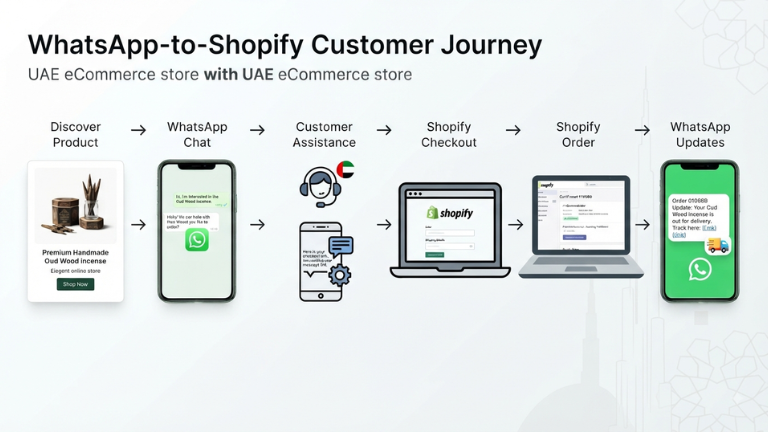
The exact setup depends on the app or integration, but the customer journey usually follows a simple process:
1. Customer discovers the product
The customer visits your Shopify website through Google, Instagram, an advertisement, or another marketing channel.
2. Customer starts a WhatsApp conversation
You can add a WhatsApp button to your store so customers can ask questions before buying.
3. Customer receives assistance
Your team can answer questions about product availability, sizes, delivery, returns, or other store policies.
4. Customer completes checkout
Instead of collecting all the order details manually through WhatsApp, you can direct the customer to the Shopify product page or checkout.
This keeps the order inside Shopify.
5. Shopify records the order
Once the customer completes the purchase, Shopify stores the order for fulfilment, inventory management, and reporting.
6. WhatsApp handles updates or follow-ups
Depending on the integration, your Shopify store can send WhatsApp order updates, shipping notifications, cart recovery messages, or other approved communications.
What to Expect Before It’s Live
Most third-party apps require Meta Business verification before they can send template messages, such as order confirmations, at scale. You may need to verify your business details and, in some cases, provide documents such as your UAE trade licence. This process can take longer than the technical setup.
Once Meta approves the setup, a well-built flow can confirm the order and delivery address automatically. It can also link the customer’s reply to the relevant Shopify order and notify your fulfilment team. This keeps important order details out of personal chat threads.
Common Mistakes UAE Stores Make
These mistakes can lead to failed deliveries and support issues. They often become noticeable only after WhatsApp starts handling a higher volume of customer conversations. We also cover a similar issue in our guide to reducing COD returns in e-commerce.
- Using a personal WhatsApp number instead of a business API-connected number — this limits team access and makes it harder to manage customer conversations.
- Relying on manual confirmations — without automation, your team can easily miss orders when message volume increases.
- Failing to sync the catalogue with the live store — customers may receive outdated prices or product availability information.
Frequently Asked Questions
Is WhatsApp Business API free?
The WhatsApp Business API itself doesn’t have a flat licence fee, but Meta charges per conversation once you go beyond the free tier, and most third-party apps add their own subscription on top.
Do I need Meta Business verification for Shopify WhatsApp integration?
For basic click-to-chat, no. For automated template messages like order confirmations at scale, yes, Meta requires business verification before approving message templates.
Can customers pay through WhatsApp on Shopify?
Not directly within WhatsApp itself. Most integrations send a secure Shopify checkout link inside the chat, so payment still happens on your store, keeping the transaction within Shopify’s checkout and reporting.
How long does it take to set up WhatsApp integration on a Shopify store?
A basic click-to-chat button can go live in under a day. Automated order confirmations and COD verification usually take one to two weeks. Most of that time is spent waiting on Meta’s business verification and template approval, not the technical build.
Do I need a developer to set up WhatsApp integration with Shopify?
Not for a basic chat button. But automated confirmations, catalogue sync, and business API approval are easy to get wrong without experience; a rejected message template or a broken sync usually costs more in missed orders than having a Shopify partner set it up correctly the first time.
Final Thoughts
WhatsApp isn’t competing with your website; it’s a communication channel that can work alongside it. The stores that lose sales aren’t the ones using WhatsApp; they’re the ones running it as a disconnected side channel. If you’re building or upgrading your Shopify store, it’s worth connecting WhatsApp from day one, along with ongoing Shopify support to keep everything running smoothly as order volume grows.
Ready to connect WhatsApp to your Shopify store the right way? Get a free consultation with MAQ Computer Services LLC, and we’ll walk you through the setup.
Contact MAQ Computer Services LLC.
Official Shopify Partner — UAE
Phone: +971 55 494 3599 | +971 50 708 0116
Email: info@maquae.com