You open Shopify Analytics and notice that your store traffic has suddenly increased. For a moment, it looks like your latest advertising campaign is finally working.
Then you check your orders.
Nothing has changed.
When you examine the report more closely, most of the visitors appear to be coming from China, Singapore or another country where you do not advertise or sell.
If this sounds familiar, your store may be receiving Shopify bot traffic.
For a UAE business owner investing in Meta Ads or Google Ads in AED, suspicious traffic is more than an unusual number in Analytics. It can make conversion reports harder to understand and lead to poor marketing decisions.
However, an unexpected traffic increase does not always mean your store is under attack. Some automated visitors are harmless or even useful. The first step is to confirm what is happening before trying to block the traffic.
What is Shopify bot traffic?
Shopify bot traffic is website activity generated by automated software rather than genuine shoppers.
Some bots help search engines discover your products. Others create social media previews, monitor website availability, or compare prices. Harmful bots may scrape product information, submit spam forms, create fake accounts, or test checkout and payment processes.
A sudden traffic increase can be a warning sign, but it is not proof. Store owners should examine traffic sources, locations, landing pages, and Shopify’s human or bot session report before taking action.
Why did my Shopify traffic suddenly increase?
Several situations can cause an unexpected increase in Shopify sessions:
- A successful advertising campaign
- A social media post or influencer mention
- A new backlink from another website
- Search engines crawling newly published products
- Price-comparison websites collecting product information
- A recently installed Shopify app
- Website performance or quality testing
- Spam bots, scrapers, or other automated systems
Before assuming the traffic is fake, check what changed immediately before the increase.
Did you launch an advertisement? Publish a new product? Install an app? Send an email campaign? Ask a Shopify developer to test the website.
Legitimate marketing and technical activities can sometimes resemble bot traffic.
Why am I getting visitors from countries where I do not sell?
Seeing traffic from countries outside your target market can be confusing. However, the location displayed in Analytics does not automatically confirm that the visit came from a genuine customer or a harmful bot.
Unexpected international traffic may come from:
- Search-engine crawlers
- Product and price scrapers
- Website-monitoring services
- Third-party Shopify apps
- Visitors using VPNs or proxy services
- Genuine overseas visitors
- Automated systems operating from international data centres
For example, a UAE-only store may see Shopify traffic from China even though no campaigns target that country. It could be a scraper checking prices, an automated service visiting product pages, or a visitor using a VPN.
Why suspicious traffic matters to UAE Shopify businesses
Many UAE Shopify businesses advertise primarily in Dubai, Abu Dhabi, and selected GCC markets. When a store suddenly receives thousands of visits from countries outside those campaigns, the reported conversion rate may fall even though genuine UAE customer behavior has not changed.
This creates a business problem.
A store owner may pause a successful campaign because the overall conversion rate looks poor. The marketing team may conclude that a product page is not working. An agency may reduce the budget of an advertisement that is still bringing genuine customers.
Stores that offer cash on delivery must also distinguish between simple bot visits and suspicious order activity. A visitor viewing a product automatically is different from a system creating accounts, placing free orders, or repeatedly attempting payments.
Before changing an advertising budget, compare human sessions, UAE and GCC traffic, campaign locations, completed orders, and genuine checkout activity.
How can I identify bot traffic on Shopify?
One unusual number is rarely enough. Look for several signals appearing together.
| Traffic signal | Possible explanation | What the business owner should check |
| Sessions increase while orders remain unchanged. | Automated or low-quality traffic | Campaign activity and traffic sources |
| Most sessions come from one unexpected country. | Scraper, VPN, or data center activity | Visitor behavior and landing pages |
| One product receives repeated visits. | Price or inventory scraping | Ads or social links pointing to that product |
| Conversion rate suddenly falls. | Non-converting sessions may be diluting the report. | Human-only conversion rate |
| Strange customer accounts appear. | Automated account creation | Names, emails, and account creation times |
| Numerous free orders appear | Bots or people exploiting a free product | Product availability and order details |
| Repeated payment attempts occur. | Possible card testing or checkout automation | Payment records and fraud indicators |
| Shopify and GA4 show different totals. | Different tracking and filtering methods | Date range, time zone, and consent settings |
Use Shopify’s Human or Bot session report
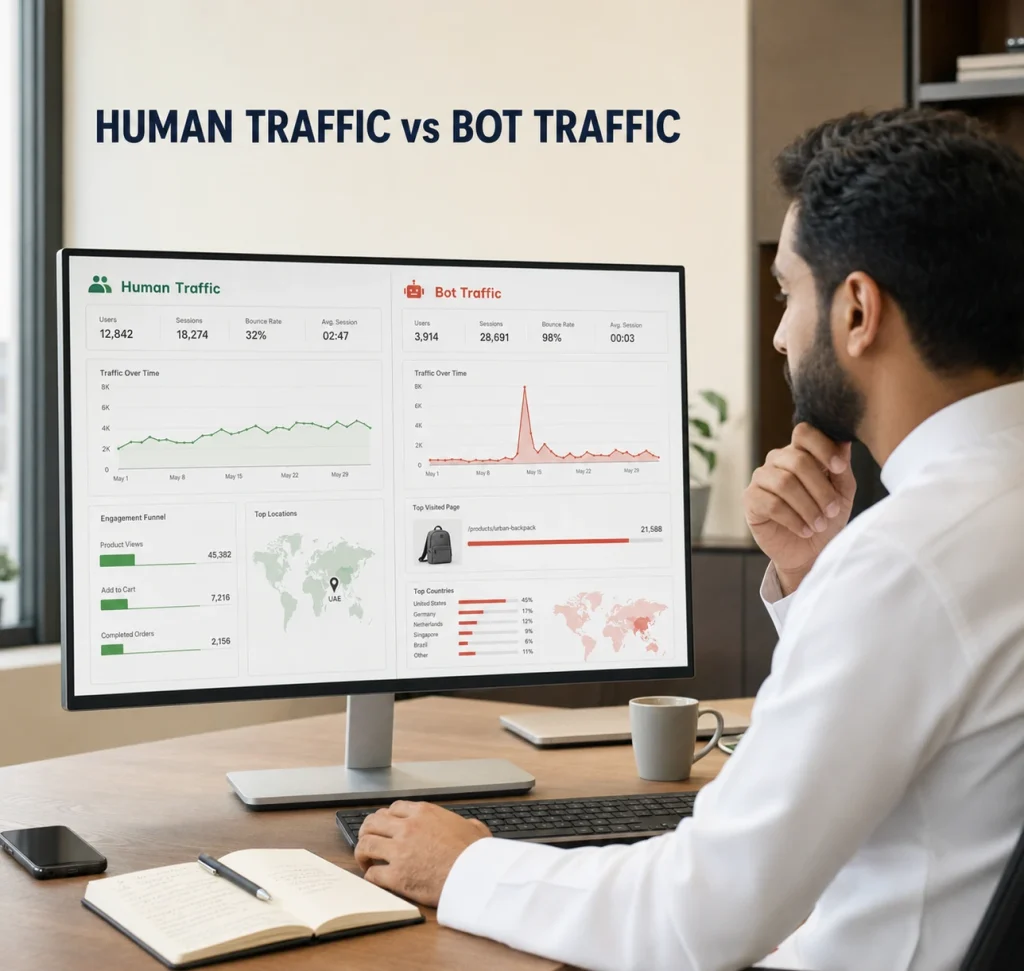
Shopify Analytics can classify sessions as likely human or bot activity.
To check it:
- Go to Shopify Admin → Analytics → Reports.
- Open a report that contains session data.
- Open the report configuration panel.
- Add Human or bot session as a dimension.
- Apply a filter where the session is Human.
- Compare the human-only report with your total traffic.
Shopify’s classification is intentionally cautious. This reduces the chance of a real customer being incorrectly labelled as a bot, but it also means that some sophisticated automated sessions may not be detected immediately.
Compare traffic over a meaningful period
A single day of unusual traffic may not represent the actual direction of your business.
Compare:
- The affected day with the previous day
- The current week with a similar week
- The last 30 days with the previous 30 days
- Periods with similar advertising activity
Do not compare a major promotion with a normal week. Campaign launches, seasonal demand, and publicity can create genuine traffic increases.
Review landing pages and visitor actions
Check which pages received the unexpected traffic.
Bot activity may repeatedly target:
- Product pages
- Collection pages
- Store-search URLs
- Customer account pages
- Contact forms
- Newsletter forms
- Cart and checkout pages
If thousands of sessions visit the same product without viewing another page, adding to the cart or beginning checkout, the traffic may be automated.
However, poor engagement can also happen when an advertisement attracts the wrong audience. Always review the traffic source before deciding that bots are responsible.
Check recent apps and store changes
A new Shopify app, custom integration, or testing tool may generate activity that appears suspicious.
Check whether the increase began after:
- Installing or updating an app
- Updating the theme
- Connecting a product feed
- Adding a marketing integration
- Running a website performance test
- Migrating customer or product data
- Changing analytics or cookie-consent settings
Regular reviews of themes, apps, checkout, and tracking should be part of a monthly Shopify maintenance checklist.
Does bot traffic affect Shopify conversion rate?
Yes. Bot sessions can make the conversion rate displayed in Shopify analytics appear lower.
Imagine that your Shopify store receives 1,000 genuine sessions and 30 orders. Your conversion rate is 3%.
If another 4,000 automated sessions are counted but produce no orders, the unfiltered conversion rate falls to 0.6%.
Your genuine customers have not necessarily stopped converting. The report is now combining human and automated sessions.
This can make it difficult to understand:
- Whether campaigns are attracting potential customers
- Which products are performing well
- Whether conversion improvements are working
- How customers move from product pages to checkout
- Whether a sales decline comes from traffic or a store problem
Compare the total conversion rate with the human-only conversion rate before making changes to prices, advertisements, or landing pages.
A falling conversion rate is not always caused by bots. Poor targeting, expensive shipping, checkout errors, unclear product information, or a slow mobile experience can produce a similar result.
Can bot traffic affect Meta Pixel?
Potentially. The effect depends on the type of automated visitor.
A basic crawler that does not execute JavaScript may not trigger Meta Pixel events. A more advanced automated browser may trigger events such as:
- PageView
- ViewContent
- AddToCart
- InitiateCheckout
This may inflate some top-of-funnel events or add suspicious visitors to website audiences. It does not automatically mean that your Meta advertising data has been permanently damaged.
Check Meta Events Manager for:
- A sudden increase in PageView or ViewContent events
- Events concentrated in countries you do not target
- AddToCart events without corresponding checkouts
- Purchase events that do not match Shopify orders
- Unexpected changes after a tracking update
Compare Meta events with actual Shopify orders before pausing campaigns or changing budgets. If the source of the problem is unclear, a structured Shopify marketing and analytics review can help separate traffic-quality issues from tracking or campaign problems.
Can bot traffic affect Google Ads?
Traffic appearing in Shopify does not necessarily mean that someone clicked a Google advertisement.
Google Ads uses automated systems to identify clicks and impressions that are not caused by genuine user interest. This can include automated clicks, duplicate clicks and irregular data-centre traffic.
Google may remove detected invalid interactions before billing or apply a credit when invalid activity is identified later.
To check invalid clicks:
- Open the campaign table in Google Ads.
- Select Columns.
- Search for invalid clicks.
- Add the column to the report.
- Check Billing → Summary for invalid-activity adjustments.
A sudden traffic increase or low conversion rate does not automatically mean that your Google Ads budget was spent on bots. Changes in budgets, keywords, locations, placements, and seasonal demand can also increase visits.
Review Google’s official information about invalid traffic in Google Ads before concluding that a campaign received fake clicks.
How can I block suspicious visits on Shopify?
Completely blocking every bot is neither practical nor beneficial. Search engines, social media preview tools, accessibility services, and approved app integrations also use automated systems.
The better approach is to identify what the suspicious traffic is doing and protect that part of the store.
1. Filter bots from business reports
Filtering does not stop visits. It helps prevent automated sessions from misleading your sales and marketing analysis.
Create two saved report views:
- Human sessions for business decisions
- Bot sessions for monitoring unusual patterns
Use the human-only view when evaluating conversion rate, landing pages, and campaign quality.
2. Confirm that hCaptcha is active.
Shopify enables hCaptcha by default to reduce automated spam.
It can protect:
- Contact forms
- Newsletter forms
- Blog comments
- Customer login pages
- Account-creation pages
- Password-recovery pages
Go to Online Store → Preferences → Spam protection and confirm that hCaptcha is enabled.
Avoid adding multiple CAPTCHA solutions without testing them. Third-party CAPTCHA code can conflict with Shopify’s built-in protection and create unnecessary challenges for genuine customers.
3. Keep themes and apps updated
Outdated themes, apps, and custom scripts can create tracking, performance or security problems.
Regularly review:
- Recently installed apps
- Apps that are no longer required
- Theme updates
- Custom scripts
- Marketing pixels
- Product feeds
- Third-party integrations
If you are considering a fraud-prevention or traffic-control app, check whether it suits your store and target market. The guide to the best Shopify apps for UAE stores explains how to evaluate apps without unnecessarily slowing down the storefront.
4. Protect orders and payment activity
If suspicious visits are accompanied by free orders, failed payments or unusual checkout attempts, the problem may involve fraud rather than simple analytics pollution.
Review:
- Shopify order-risk indicators
- Repeated names, addresses or emails
- Multiple failed payment attempts
- Unexpected order quantities
- Unusual $0 orders
- Chargebacks
- Large numbers of abandoned checkouts
For stores offering cash on delivery, confirm orders before fulfilment when the order details appear unusual. Do not assume that every abandoned COD order was created by a bot; genuine customers also change their minds or enter incorrect information.
Shopify Plus merchants can request additional checkout bot protection for flash-sale events. This feature is designed mainly to slow down auto-checkout bots and should not be treated as a complete fraud-prevention system.
5. Be careful when blocking countries
Country-blocking and IP-blocking apps may reduce some unwanted visits, but they cannot guarantee that all bots will be stopped.
Sophisticated automated systems can:
- Change IP addresses
- Use VPNs
- Operate from different countries
- Imitate normal browser behaviour
- Return through another traffic source
Broad geographic blocking may also affect genuine customers, travellers, corporate VPN users and useful automated services.
This is especially important in the UAE, where customers may travel frequently or access stores through company networks. Begin with narrow rules and test the complete customer journey after applying them.
6. Do not use robots.txt as a security tool
A robots.txt rule can ask cooperative crawlers not to access certain areas. Malicious bots can ignore it.
Incorrect robots.txt changes may also stop search engines from discovering important product, collection, or blog pages.
Do not block Googlebot, Bingbot, or other beneficial crawlers simply because automated traffic is appearing in Shopify Analytics.
7. Document serious activity
If suspicious activity continues, record:
- The date and time of each spike
- Countries and cities shown in reports
- Traffic sources and referrers
- Affected landing pages
- Device categories
- Unusual customer accounts
- Suspicious orders or payment attempts
- Recent app or theme changes
- Screenshots from Shopify and GA4
This information gives Shopify Support or your technical team something specific to investigate.
Shopify already uses Cloudflare services, a web application firewall and DDoS protection for online stores. These protections operate automatically. Shopify explains the available measures in its official guide to protecting stores from bots.
A quick Shopify bot traffic checklist
If your Shopify traffic suddenly increases, follow these steps:
- Check recent marketing campaigns, promotions and social mentions.
- Add the human or bot session dimension in Shopify Analytics.
- Review countries, landing pages, devices and traffic sources.
- Compare Shopify sessions with GA4 engagement and completed orders.
- Check for unusual accounts, searches, orders, or payment attempts.
- Confirm that hCaptcha is active.
- Review recently installed apps and theme changes.
- Compare Meta and Google Ads events with actual Shopify orders.
- Save evidence before applying blocking rules.
- Contact Shopify Support if the activity affects orders, payments, or store performance.
The objective is not to make every automated visit disappear. It is to keep business reports reliable and protect genuine customers.
Frequently asked questions
1. Why did my Shopify traffic suddenly increase?
A sudden increase may come from an advertising campaign, social mention, app integration, product feed, search crawler, or automated bot. Review the traffic source and Shopify’s human- or bot-session classification before taking action.
2. Why am I getting visitors from countries where I do not sell?
Search crawlers, scrapers, data-centre services, VPN users and genuine overseas visitors can all appear in Shopify reports. The visitor’s country alone does not prove that the traffic is fake.
3. How can I identify bot traffic?
Use Shopify’s Human or bot session dimension. Look for unusual traffic volume, repeated landing pages, unexpected locations, strange accounts, abnormal searches, free orders, or repeated payment attempts.
4. Does bot traffic affect conversion rate?
Bot sessions that do not produce orders can increase the total session count and make the reported conversion rate appear lower. Filter the report to human sessions to understand genuine customer performance.
5. Can bot traffic affect Meta Pixel and Google Ads?
An automated browser that executes JavaScript may trigger some Meta Pixel events. Google Ads separately identifies and filters ad interactions that it considers invalid. Compare advertising reports with genuine Shopify orders before changing campaigns.
6. How can I block suspicious Shopify traffic?
Confirm that hCaptcha is active, keep themes and apps updated, use appropriate fraud controls and investigate the affected pages or actions. Avoid blocking entire countries unless you have strong evidence and a clear business reason.
7. Is Shopify traffic from China always bot traffic?
No. It may come from scrapers, crawlers, apps, data centres, VPN users or genuine visitors. Check visitor behaviour and Shopify’s bot classification instead of making a decision based only on location.
8. Can I completely stop bot traffic on Shopify?
No solution can reliably stop every automated visit without potentially affecting useful crawlers or legitimate users. Focus on filtering reports and preventing harmful actions.
Final thoughts
A sudden increase in Shopify traffic without additional sales can be frustrating. But immediately blocking countries or changing advertising campaigns may create new problems without solving the real cause.
Start with evidence.
Separate human and automated sessions. Review where visitors came from, which pages they accessed, and whether they performed meaningful shopping actions.
If suspicious traffic is affecting your reports, advertising data, payment attempts, or checkout, the Dubai-based MAQ Computer Services LLC team can help through its Shopify support and training service.
Visit the official website: MAQ Computer Services LLC
Call us: +971 50 708 0116 (WhatsApp) | +971 55 494 3599
Office: Office No. 35, 19th Floor, The Binary Tower by Omniyat, Marasi Dr, Business Bay, Dubai