
Running an online store without checking your numbers can make sales problems difficult to spot. You may see orders coming in, but you still do not know which products, customers, channels, or pages are actually helping your business.
Shopify Analytics gives store owners a practical way to understand what is happening. Instead of checking every number, focus on a few useful metrics and compare them over time.
For businesses in the United Arab Emirates, Dubai, and other GCC markets such as Saudi Arabia and Kuwait, this can help answer simple business questions:
Are sales falling?
Which products are selling?
Are customers coming back?
Is advertising bringing valuable visitors?
What is Shopify Analytics?
Shopify Analytics brings important store data into one place. The dashboard can show sales, sessions, conversion rate, average order value, returning customers, and other performance metrics. You can also compare different periods to identify changes.
You do not need to study every report. The goal is to use the numbers to understand what changed and what needs attention.
The numbers are worth checking regularly.
| Metric | What it can tell you |
| Net sales | Whether revenue is growing or falling |
| Orders | Whether customers are actually buying |
| Conversion rate | How well visitors become customers |
| Average order value | How much do customers spend per order |
| Sessions | Whether enough people are reaching your store |
| Returning customer rate | Whether customers are coming back |
| Sales by product | Which products contribute to revenue |
| Sales by channel | Where your orders are coming from |
Shopify’s sales reports can break sales down by time, product, customer, and sales channel, making them useful when you want to investigate a change rather than simply watch the dashboard.
How to find a sales problem with Shopify Analytics
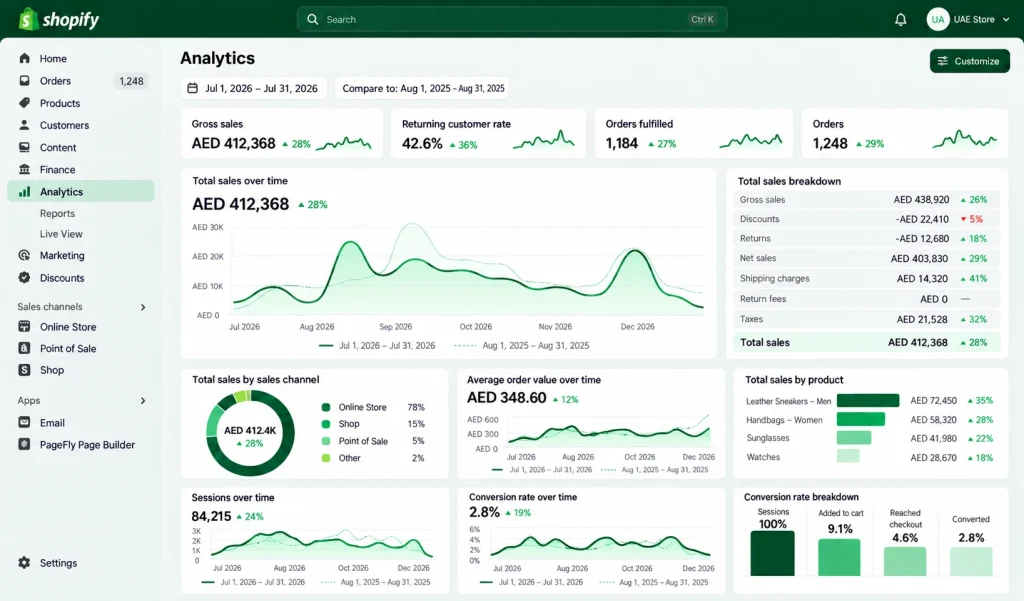
Start with a simple comparison. Look at the last 30 days and compare them with the previous 30 days or the same period last year.
Then ask:
Did sales fall because fewer people visited or because fewer visitors purchased?
This distinction matters.
If sessions have dropped, the issue may be related to marketing, search visibility, social traffic, or advertising.
If sessions are steady but orders have fallen, look more closely at your product pages, offers, checkout experience, pricing, and customer journey.
That is where Shopify store analytics becomes more useful than simply checking your daily revenue.
Look at products, not just total sales.
Total revenue can hide problems.
Imagine a Dubai fashion store making AED 100,000 this month. At first glance, everything may look healthy. But Shopify sales analytics could show that most revenue came from only two products, while several others received traffic but generated very few orders.
That changes the business question.
Instead of asking, “Why are sales down?” you can ask:
- Which products are losing sales?
- Which products are growing?
- Which products receive visits but few purchases?
- Which products generate the highest order value?
- Are discounts helping or reducing revenue?
This type of e-commerce sales analysis can help you decide what deserves more promotion, better product content, or a pricing review.
Understand Your Customers, Not Just Your Sales
Sales from new customers are useful, but repeat customers can tell you something different about your store.
Look at your returning customer rate and compare it over time. A store may be getting plenty of new visitors while losing customers who previously purchased.
This is where Shopify RFM analysis can become useful for businesses with enough customer data.
RFM looks at three areas:
- Recency: How recently did someone buy?
- Frequency: How often do they buy?
- Monetary value: How much do they spend?
You can use this thinking to identify valuable repeat customers, customers who have stopped purchasing, and customers who may respond to a relevant offer.
You do not need to turn this into a complicated data project. Even a basic understanding of these customer groups can improve retention campaigns.
Check where your sales come from.
Your e-commerce analytics should connect sales with your marketing activity.
For example, you may be spending heavily on Instagram or Google Ads because they generate many visitors. But if another channel brings fewer visitors and more actual customers, the second channel deserves closer attention.
Use Shopify analytics reports to compare sales by channel and examine your traffic alongside orders.
For broader e-commerce marketing analytics, you may also need tools outside Shopify, particularly when you want deeper information about campaigns, search traffic, or specific marketing sources.
The important point is to connect traffic with revenue, rather than celebrating traffic alone.
What if Shopify Analytics is down or looks different?
Sometimes merchants search for “Shopify Analytics down” when numbers appear delayed, reports look different, or a metric suddenly changes.
Before assuming your store has a sales problem, check the date range and compare the same period carefully.
Shopify says its analytics dashboard data is generally updated within about one minute. However, Shopify also notes that analytics data can differ slightly from other analytics and reporting tools.
Recent Shopify changes to session measurement can also affect session and conversion-rate figures without necessarily meaning that your actual orders or customer behaviour changed.
So, do not make a major business decision from one unusual number.
A simple weekly Shopify Analytics routine
You can keep your review short.
Every week, check:
- Sales: Are sales moving up or down?
- Orders: Is the change coming from order volume?
- Conversion: Are visitors buying at the same rate?
- Products: Which products gained or lost sales?
- Customers: Are existing customers returning?
- Channels: Which sources are actually producing orders?
- AOV: Are customers spending more or less per order?
This gives you a practical view of your Shopify website analytics without spending hours inside reports.
Do not react to every small change.
One slow day does not necessarily mean your store has a problem.
Look for patterns across several days or weeks. Also consider promotions, holidays, product availability, advertising changes, and seasonal demand.
For example, Ramadan, Eid, Black Friday, and regional shopping periods can change buying behaviour across the United Arab Emirates, Saudi Arabia, and Kuwait. Comparing the right periods makes your data much more useful.
Final takeaway
Analytics in e-commerce is useful when it leads to a business decision.
Shopify Analytics can help you identify falling sales, weak products, changes in conversion, customer retention issues, and differences between sales channels. The goal is not to become an analytics expert. It is to understand enough of your store data to know what needs attention next.
If the numbers show a problem but you cannot identify the reason, a Shopify specialist can help review your store, customer journey, products, and marketing data together rather than looking at sales figures in isolation.
Frequently Asked Questions
What is Shopify Analytics used for?
Shopify Analytics helps store owners monitor sales, orders, visitors, conversion, products, customers, and other store performance data.
What should I check first in Shopify Analytics?
Start with sales, orders, conversion rate, average order value, sessions, and returning customer rate.
How can Shopify Analytics help increase sales?
It can show where sales are falling, which products perform well, and whether changes are happening in traffic, conversion, or customer retention.
Can Shopify Analytics show which products sell the most?
Yes. Shopify provides sales reports that can break sales down by product and other dimensions.
Why are my Shopify Analytics numbers different from another analytics tool?
Different tools can use different measurement methods and attribution rules, so small differences are possible. Shopify also notes that its dashboard data may vary slightly from third-party analytics and reporting tools.
Contact MAQ Computer Services LLC.
Official Shopify Partner — UAE
Phone: +971 55 494 3599 | +971 50 708 0116
Email: info@maquae.com


