Running an online store on Shopify can be exciting, especially as your business grows in the United Arab Emirates. As operations expand, many businesses develop custom applications to automate processes, integrate external systems, and improve overall store performance. However, once the application is ready, implementing the right strategies for migrating existing store data to a custom Shopify app becomes essential to ensure a smooth and secure transition.
Many businesses worry about the migration process. Will products and inventory transfer correctly? Will customer records and order history remain intact? Could the migration affect store performance or cause downtime?
These concerns are completely understandable. With proper planning and the right strategies for migrating existing store data to a custom Shopify app, businesses can transfer store information safely while maintaining a smooth shopping experience. In this guide, MAQ Computer Services LLC—an Official Shopify Partner—provides practical approaches to managing Shopify store data migration efficiently for growing e-commerce businesses in the UAE.
Why Shopify Store Data Migration Is Important for Growing Businesses
When businesses build custom applications, their existing store data becomes extremely valuable. Product catalogs, customer profiles, and order history contain important business insights that help companies understand purchasing behavior and improve operational decisions.
For many e-commerce businesses across the United Arab Emirates, maintaining accurate store data is essential for delivering seamless customer experiences. A well-planned Shopify app migration process ensures that all important information is accurately transferred to the new system.
Without a structured approach, businesses may face data inconsistencies, missing records, or integration problems. For growing UAE online stores, implementing reliable Shopify store migration strategies helps maintain operational stability while enabling future scalability.
Types of Shopify store data That Need to Be Migrated
Before implementing Shopify store data migration strategies, it is important to understand what information must be transferred.
Product Data
Product information includes titles, descriptions, images, pricing, SKUs, and variants. Proper product migration ensures customers can continue browsing and purchasing items without confusion.
For UAE businesses managing large product catalogs, accurate product data migration helps maintain a consistent shopping experience.
Customer Information
Customer profiles contain names, email addresses, shipping details, and purchase history. Migrating this information correctly helps businesses maintain customer relationships and marketing insights.
Order History
Order records provide valuable information about transactions, payments, and shipping details. Preserving order history is essential for reporting, customer support, and sales analysis.
Inventory Data
Accurate inventory migration prevents stock discrepancies and ensures the store continues to operate smoothly.
Store Metadata
Additional store elements such as tags, metafields, and custom attributes should also be transferred to ensure the custom application works correctly.
Strategies for Migrating Existing Store Data to a Custom Shopify App
Implementing the right Shopify data migration strategies helps businesses move their data securely while minimising risks.
1. Conduct a Complete Data Audit
Before starting the migration, review the existing store database carefully.
A data audit helps identify duplicate records, outdated product listings, or incomplete customer information. Cleaning the data before migration improves accuracy and reduces potential issues during the transfer process.
This step forms the foundation of successful Shopify store data migration best practices.
2. Create a Secure Backup
Before transferring any data, businesses should create a complete backup of their Shopify store.
Important elements to back up include the following:
- Product catalogs
- Customer records
- Order history
- Store pages and blog content
- Product images and media files
Having a backup ensures that store data can be restored if an issue arises during the Shopify data transfer process.
3. Use APIs for Efficient Data Transfer
One of the most effective approaches to migrating Shopify store data to a custom app is to use APIs.
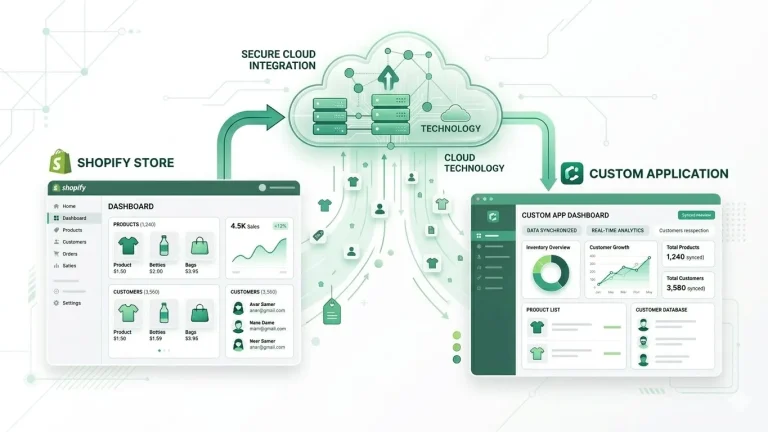
APIs allow developers to securely access store data and transfer it directly into the custom application. This method supports automation and helps synchronise product information, customer records, and order history.
For large e-commerce businesses in the UAE, API-based migration significantly improves accuracy and efficiency.
4. Map Data Fields Between Systems
Data mapping ensures the Shopify database structure aligns with the custom application’s structure.
Correct data mapping prevents missing information and supports reliable Shopify database migration workflows.
5. Test the Migration Process
Before migrating the entire store database, it is important to perform a test migration. Testing helps developers identify potential issues, such as incorrect field mapping, missing product images, or integration errors. By resolving these problems early, businesses can avoid disruptions during the full migration. Testing is an important step in any Shopify store data migration guide.
6. Automate the Migration Process
Manual data migration can be time-consuming, especially for stores with thousands of products and customers.
Automation tools and migration scripts help businesses move large datasets quickly and consistently. Automation reduces the risk of human error and ensures the migration process runs smoothly.
For many growing UAE Shopify stores, automation becomes a key component of effective Shopify app data migration strategies.
7. Monitor Store Performance After Migration
Once the migration process is complete, businesses should carefully review store functionality.
Post-migration monitoring should include:
- Checking product pages and images
- Verifying inventory levels
- Testing checkout and order processing
- Confirming third-party integrations work correctly
Continuous monitoring ensures that the Shopify store data transfer to a custom app is successful.
Challenges During Shopify Data Migration
Even with proper planning, businesses may encounter challenges during the migration process.
Some common issues include:
- Data compatibility differences between systems
- Missing metadata or product images
- Integration errors with external platforms
- Temporary store performance changes
Understanding these challenges helps businesses prepare better Shopify data transfer strategies.
When to Consider Professional Shopify Migration Services
For large stores or complex migrations, businesses may benefit from working with experts.
Professional Shopify migration services or a specialised Shopify migration agency can assist with:
- Secure data transfer processes
- Custom Shopify application development
- Integration with ERP and CRM systems
- Testing and post-migration optimization
For businesses in the United Arab Emirates, working with an official Shopify partner like MAQ Computer Services LLC can help ensure a smooth and secure migration process.
Conclusion
As online businesses continue to grow across the UAE e-commerce market, many companies are developing custom solutions to improve their Shopify stores. However, moving store information into a new application requires careful planning and structured execution.
By implementing effective strategies for migrating existing store data to a custom Shopify app, businesses can safely transfer products, customers, orders, and inventory. With proper preparation, testing, and monitoring, Shopify data migration becomes a manageable process that supports long-term growth and scalability.
Ready to Migrate Your Shopify Store Data?
Connect with MAQ Computer Services LLC, official Shopify Partners in the UAE. Share your vision, and we’ll help you migrate your store data safely while building a custom Shopify solution that fits your business needs.
| Contact MAQ Computer Services LLC. Official Shopify Partner — UAE Phone: +971 55 494 3599 | +971 50 708 0116 Email: info@maquae.com Shopify Partner Directory: View our official Shopify Partner Profile. |
Frequently Asked Questions (FAQs)
1. What are the best strategies for migrating existing store data to a custom Shopify app?
The best strategies include conducting a complete data audit, creating secure backups, mapping data fields, using APIs for migration, testing the process, automating transfers, and monitoring post-migration performance. Following these Shopify store data migration strategies ensures a smooth and secure transition.
2. How long does a Shopify data migration to a custom app usually take?
The duration depends on the store size, number of products, customers, and integrations. Small stores may take a few hours, while large or complex stores may take several days. Using Shopify migration services with automation helps speed up the process safely.
3. Can migrating Shopify store data cause downtime?
If not planned carefully, migration can cause temporary performance issues. However, by following Shopify store data transfer to custom app best practices — including testing and backups — businesses can minimise downtime and maintain a seamless shopping experience.
4. What is the difference between Shopify app migration and Shopify theme migration?
Shopify app migration focuses on moving data and custom functionalities to a new app, while Shopify theme migration involves transferring the visual design, templates, and storefront layout. Both can be handled simultaneously for a full store upgrade.